
Device Profiles
MQTT Settings
Configure QoS, keep-alive, and clean session for device profiles
Each device profile includes MQTT settings that apply to all devices using that profile.
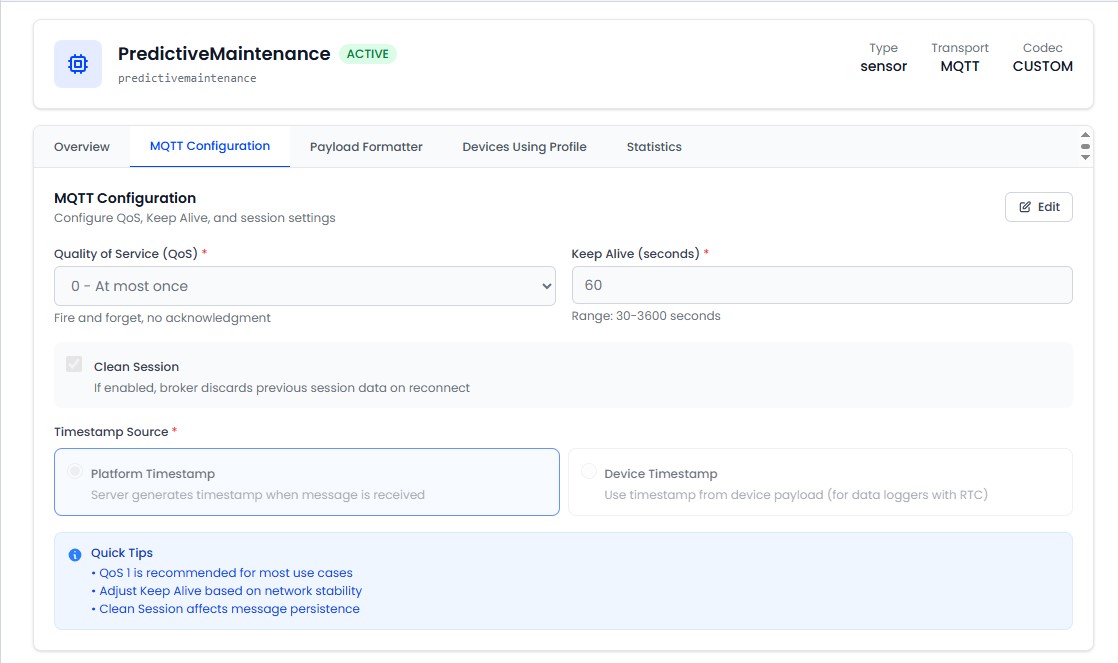
QoS Level
Quality of Service controls message delivery guarantees between devices and the broker.
| QoS | Name | Behavior | Best For |
|---|---|---|---|
| 0 | At most once | Fire and forget - no acknowledgment | High-frequency sensor data where occasional loss is acceptable |
| 1 | At least once | Guaranteed delivery - may deliver duplicates | Most IoT use cases - reliable with low overhead |
| 2 | Exactly once | Guaranteed single delivery | Critical data where duplicates cause problems |
QoS 1 is recommended for most use cases. It provides reliable delivery without the overhead of QoS 2.
Keep Alive
The keep-alive interval (in seconds) defines how often the device sends ping packets to the broker to maintain the connection. Default: 60 seconds.
- Lower values (15–30s): Faster offline detection, more network traffic
- Higher values (120–300s): Less traffic, slower offline detection
- Set to 0 to disable keep-alive (not recommended)
Clean Session
Controls whether the broker persists subscriptions and queued messages across device connections.
| Setting | Behavior |
|---|---|
| Enabled (default) | Broker discards all state when the device disconnects. Fresh start on each connection. |
| Disabled | Broker remembers subscriptions and queues messages while the device is offline. Messages are delivered on reconnection. |
Enable clean session for most IoT devices. Disable it only if your devices need to receive commands that were sent while they were offline.