
MQTT Connectivity
MQTT Overview
How Sensorclouds uses MQTT for device communication
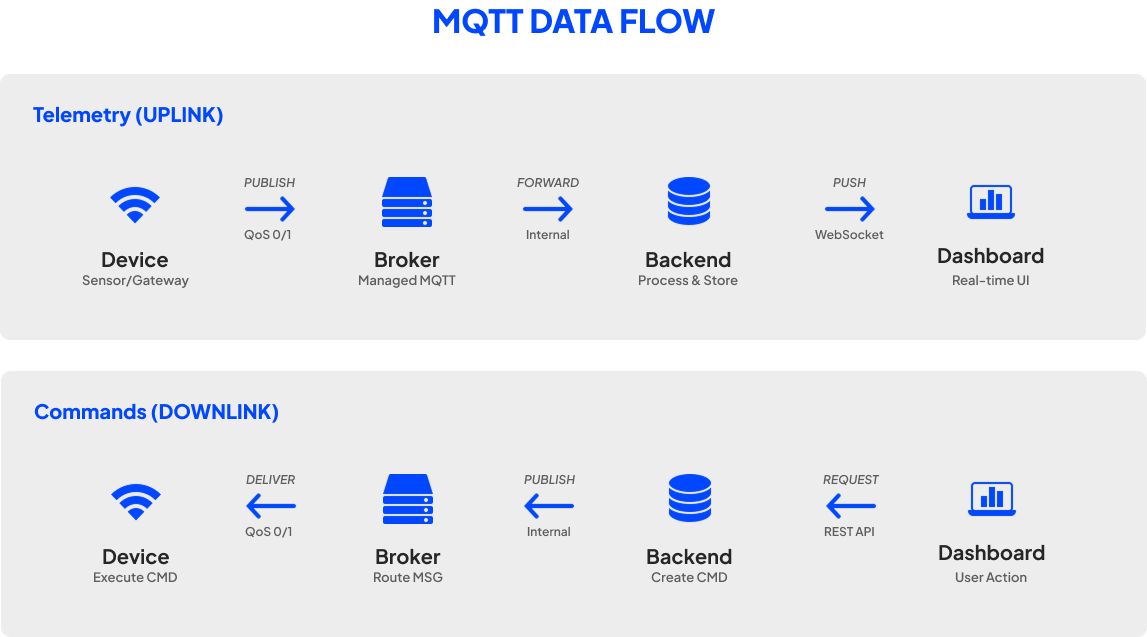
Sensorclouds uses MQTT as the primary protocol for device communication. MQTT is a lightweight publish/subscribe messaging protocol designed for constrained devices and low-bandwidth networks.
Supported Protocols
| Protocol | Port | Use Case |
|---|---|---|
| WSS (WebSocket over TLS) | 443 | Recommended - works through firewalls and proxies |
| MQTTS (MQTT over TLS) | 8883 | Embedded systems and IoT devices |
| TCP (Plain MQTT) | 1883 | Development and testing only |
Plain TCP (port 1883) transmits credentials in cleartext. Use TLS-secured connections (WSS or MQTTS) for all production deployments.
Broker Details
- Broker: a managed MQTT broker with dynamic, per-device access control
- TLS certificates: Let's Encrypt (auto-renewed)
- Authentication: Username/password validated via backend API
- Authorization: Per-device ACL rules enforced by the broker
TLS Secured
All production connections use WSS (port 443) or MQTTS (port 8883). Per-device ACL rules keep each device isolated to its own topics.
How It Works
- You register a device on the platform and receive MQTT credentials
- Your device connects to the broker using those credentials
- The broker validates credentials through the Sensorclouds backend
- ACL rules ensure the device can only access its own topics
- The device publishes telemetry and subscribes to commands