
MQTT Connectivity
MQTT Topics
Complete reference for the Sensorclouds MQTT topic structure
All MQTT topics in Sensorclouds follow a consistent hierarchical pattern.
Topic Pattern
tenant/{tenantId}/app/{applicationId}/device/{deviceToken}/{type}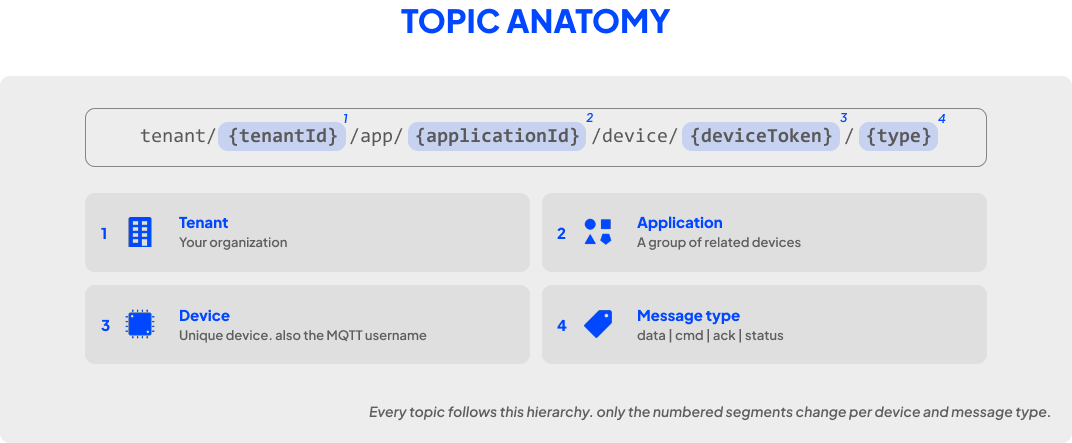
Topic Types
Telemetry Data
tenant/{tenantId}/app/{applicationId}/device/{deviceToken}/dataDevice → PlatformSend sensor readings to the platform
Payload formats:
- JSON:
{"temperature": 25.3, "humidity": 60} - Hex string:
"48656C6C6F"- auto-detected and converted to bytes before decoding - Raw bytes: Processed by the device profile's payload decoder
Commands
tenant/{tenantId}/app/{applicationId}/device/{deviceToken}/cmdPlatform → DeviceReceive commands from the platform
Command payload format:
{
  "commandId": "uuid",
  "command": "reboot",
  "parameters": { "delay": 5 }
}
Acknowledgments
tenant/{tenantId}/app/{applicationId}/device/{deviceToken}/ackDevice → PlatformAcknowledge received commands
ACK payload format:
{
  "commandId": "uuid",
  "status": "success",
  "message": "Command executed"
}
Device Status
tenant/{tenantId}/app/{applicationId}/device/{deviceToken}/statusDevice → PlatformOnline/offline status via LWT
Status payload: {"status": "online"} or {"status": "offline"}
ACL Rules
Devices can only access their own topics. The ACL service enforces:
| Action | Allowed Topics |
|---|---|
| Publish | /data, /ack, /status |
| Subscribe | /cmd |
Cross-device topic access is blocked. A device cannot publish to or subscribe to another device's topics.