
Applications
Managing Applications
Create, edit, and delete applications in Sensorclouds
Creating an Application
Navigate to Applications from the sidebar.
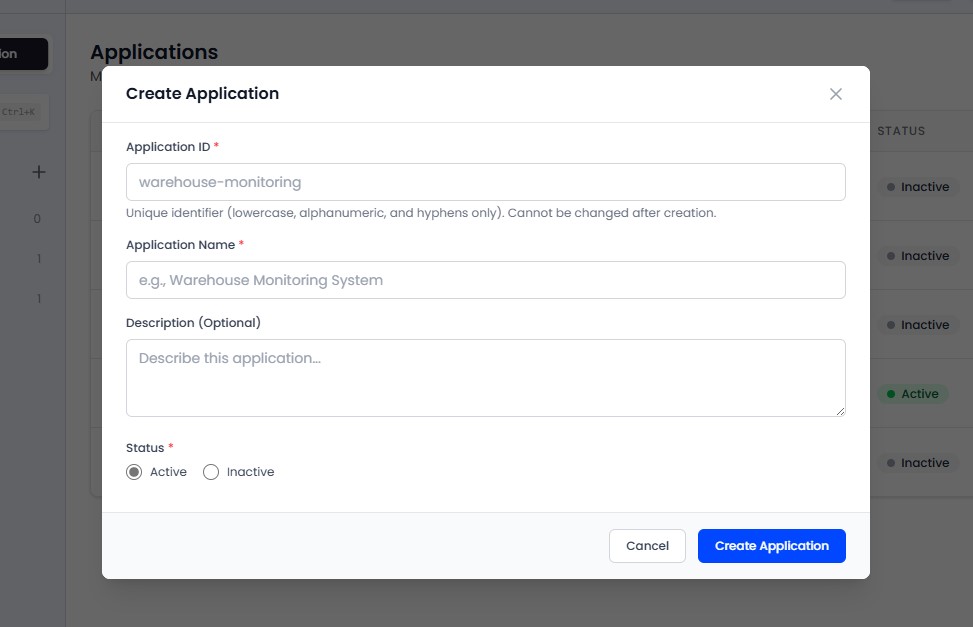
Click Add Application.
Fill in the details:
- Name (required): A descriptive name for the application
- Application ID: Auto-generated slug used in MQTT topics
- Description: Purpose and details about this group of devices
Click Save. You are taken to the application detail view.
Application List
The application list shows:
| Column | Description |
|---|---|
| Name | Application name |
| Description | Brief description |
| Created By | User who created the application |
| Devices | Number of registered devices |
Admins can see all applications in the tenant. Engineers can only see their own or assigned applications. Only Admins can delete applications.
Click any row to enter the application detail view.
Deleting an Application
Deleting an application permanently removes all associated devices and their telemetry data. This action cannot be undone. A confirmation dialog is shown before deletion.