Using Your API Key
Authenticate and call the read-only external REST API
Authentication
Send your key on every request using either header:
X-API-Key: <your-key>Authorization: Bearer <your-key>Authorization: ApiKey <your-key> is also accepted.
Responses & Pagination
- Responses are JSON.
- List endpoints are paginated with
?page=and?limit=. - Rate limiting applies per key - stay within your plan's request allowance.
Errors
| Status | Meaning |
|---|---|
401 | Missing, invalid, or expired key |
403 | Key is missing the required scope, or the requested resource is outside the key's application scope |
429 | Rate limit exceeded |
Endpoints
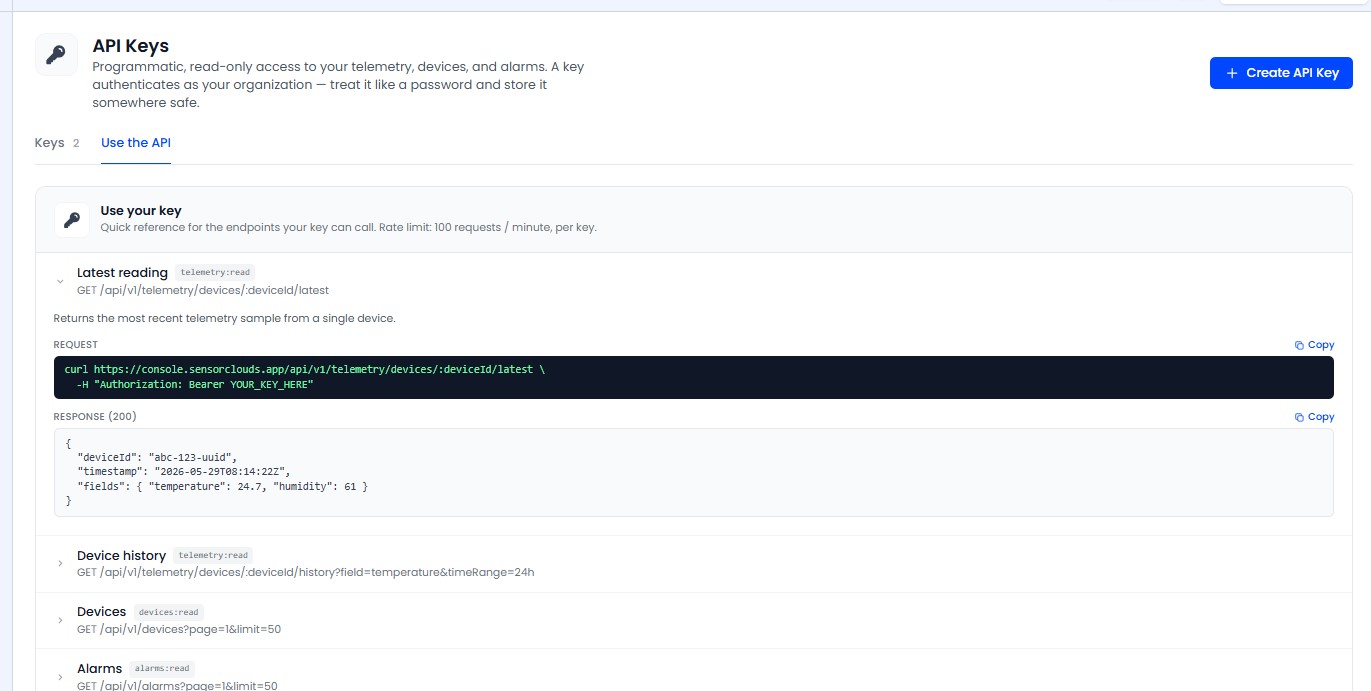
/api/v1/devicesList devices the key can see. Scope: devices:read. Query: page, limit.
/api/v1/alarmsList alarm rules/instances the key can see. Scope: alarms:read. Query: page, limit.
/api/v1/telemetry/devices/{deviceId}/latestLatest reading for a device. Scope: telemetry:read. App-scoped: if the key is restricted to specific applications, the device must belong to one of them.
/api/v1/telemetry/devices/{deviceId}/historyHistorical readings for a device. Scope: telemetry:read. Query: field, timeRange (e.g. -7d), from, to. App-scoped, same rule as latest.
Examples
curl https://<your-host>/api/v1/devices \
  -H "X-API-Key: <your-key>"
curl "https://<your-host>/api/v1/telemetry/devices/<id>/history?field=temperature&timeRange=-7d" \
-H "Authorization: Bearer <your-key>"The platform includes a "Use your key" reference panel in the UI with a copy-paste quick-test snippet that injects your live host. Open it from the API Keys page to try a request without leaving the platform.